
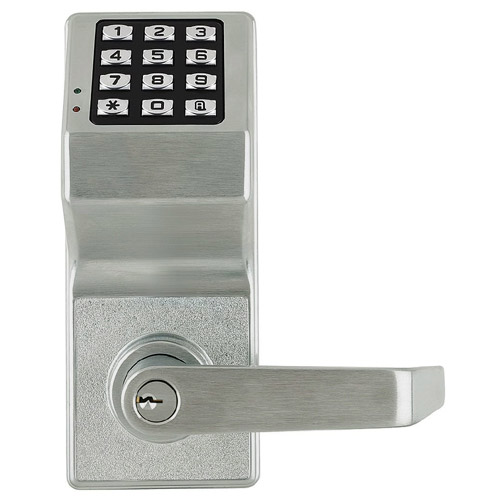
Alarm Lock DL6100 Networx: Audit Trail, No Rewiring
Posted by Kent on 17th Sep 2026
The user list living inside the lock is the real cost
A standalone keypad lock is a great fix for one door. Put ten of them on a building and you've quietly created ten separate user lists, each one only editable by standing at that specific door with a programming card or a laptop. Someone quits, and now a facilities manager is walking the building door to door, deleting a code ten times instead of once. That's the exact problem Alarm Lock's Trilogy DL6100 Networx is built to remove, without pulling wire to every opening.
Same lock body, a different way to manage it
The DL6100 mounts on the same standard cylindrical prep as Alarm Lock's simpler DL2700, a lock we've written up on its own for doors that just need PIN entry with no wiring at all. The DL6100 keeps that PIN-only, battery-powered operation on AA batteries, but adds Networx wireless networking over Ethernet or 802.11 B/G. That's the entire value proposition in one line: you get to program locks, pull audit trails, and manage schedules from a PC at a desk, instead of walking to each door with a handheld programmer.
It still takes a Schlage C keyway cylinder for mechanical key override, the same fallback every Trilogy lock keeps, and IC (interchangeable core) versions are available if the building runs a different keyway. Capacity runs 100 to 2,000 users depending on configuration, with an audit trail of up to 40,000 events stored in the lock itself, so you're not relying on a live network connection to know who opened a door and when.
When the extra networking is worth paying for
If you're managing one door, the DL2700 does the job for less money and less setup. The Networx premium earns its keep the moment you're managing more than a handful of openings on one property: a multi-door office suite, a self-storage facility with dozens of unit doors, a school with keypad locks on classroom after-hours doors. Instead of a tech visiting every door to add a new hire's code or drop a terminated employee, you push the change once from the network and it lands everywhere that lock is deployed.
The setup cost is real and worth saying plainly: getting the Ethernet or Wi-Fi side running usually needs someone who knows the building's network, in addition to a locksmith who knows the door. Budget for that up front rather than discovering it mid-install. Once it's configured, day-to-day management is genuinely hands-off, which is the whole point.
What it doesn't change
Underneath the networking, this is still a standalone battery-powered lock, not a hardwired access-control door. It doesn't need a power supply, a door controller, or conduit run to the frame, which is exactly why it fits retrofit jobs where pulling wire isn't in the budget. What Networx adds is a management layer on top of that same standalone hardware, not a different install. If a door genuinely needs real-time remote unlock or integration with a full access-control head-end, that's a different product category entirely, built around a door controller and a credential reader rather than a battery-powered lever, and worth a separate conversation with whoever specs your access-control system before you commit a budget line to it.
Battery life is the other thing worth planning around. AA batteries run a standalone lock like this for a long stretch under normal traffic, but a busy exterior door or a lock fielding hundreds of entries a day will drain faster than an interior office door. The lock warns before it dies, so a maintenance tech isn't caught off guard, but a networked deployment across a whole property is also the moment to set a battery-check schedule rather than waiting for the first complaint.
Retrofitting an existing Trilogy install
A property already running DL2700 standalone locks doesn't have to rip them out to get Networx management. Because the DL6100 shares the same cylindrical prep and PIN-only access method as the DL2700, a phased retrofit is realistic: swap the highest-traffic doors first, keep the simpler standalone locks on low-traffic openings, and add the network side one building or wing at a time. The two models talk the same key-override language too, so a Schlage C keyway master doesn't have to change partway through the project, and a tech who's already trained on one Trilogy body isn't learning a new install from scratch on the other.
What we stock
We carry the DL6100 Networx in Satin Chrome on our Alarm Lock hub, alongside the broader keyless lock selection. If a single door is all you're managing right now, our piece on the DL2700 for a door with no wiring covers the base of the Trilogy family and when a PIN-only lock without networking is the right call instead.
Common questions
Do I need a network technician to install the DL6100?
You need someone comfortable configuring the lock onto the building's Ethernet or Wi-Fi network for the initial setup. After that, day-to-day programming happens from the software, not at the door.
How many users can the DL6100 hold?
100 to 2,000 users depending on configuration, with an audit trail that stores up to 40,000 events directly in the lock.
What happens if the network goes down?
The lock keeps operating as a standalone PIN lock on battery power. Networx adds remote management on top of that; it doesn't make the door's basic function depend on a live connection.
Is the DL6100 the same lock body as the DL2700?
They mount on the same standard cylindrical prep and share the PIN-only access method. The DL6100 adds Networx wireless management; the DL2700 is the simpler standalone version with no networking.
What key override does the DL6100 use?
It ships with a Schlage C keyway cylinder for mechanical override, with interchangeable-core versions available for buildings running a different keyway.