
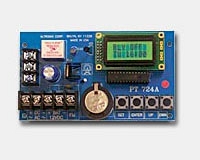
Altronix PT724A: Unlock a Door on a Schedule
Posted by Kent on 9th Oct 2026
A door that unlocks at 7:30 and locks at 5:00 without anyone touching it
A lot of buildings run on a schedule. The front office opens at 7:30. Classes change at set times. The loading dock is open for deliveries until noon. Someone has to unlock and relock those doors every day, and when that someone is out sick, the door stays however it was left. A timer does the job without the human.
The Altronix PT724A is a 365 day, 24 hour annual event timer. It is a small board with a relay on it. You program the schedule, and the relay closes and opens on its own. Here is what it does and where it fits.
What the listing gives you
- Power: 12 to 24 volts AC or DC.
- Standby current: 10 mA with the relay off, 50 mA with the relay on.
- Relay: Form C contacts, rated 10 amp at 120VAC or 28VDC.
- Events: 50 individually programmed daily or weekly events. Block programming accommodates 350 events a week.
- Holidays: 10 programmable holiday dates.
- Event types: momentary and latching.
- Memory: EEPROM, so a power failure does not erase the program.
- Clock: crystal controlled, with a lithium battery backup that maintains the time.
- Calendar: standard or daylight saving time settings, and automatic leap year compensation.
- Display: alphanumeric LCD to simplify programming.
- Charger: built in, for a 12VDC sealed lead acid or gel battery, with maximum charge current of 100 mA.
- Board size: 5.25 in. wide, 3 in. long, 1 in. high.
The listing also mentions a "first man in" option. We cover that below.
Momentary or latching: the choice that matters
This is the first thing to settle. A latching event closes the relay and holds it closed until a second event opens it. That is what you want for a door that should stay unlocked from 7:30 to 5:00. A momentary event closes the relay for a short pulse and releases. That suits a bell, a buzzer or a trigger input on another device, such as a pulse to an access control panel input to change a mode.
Program the door as a pair of events: unlock at the start of the day, lock at the end. Skipping the second event is the classic mistake, and it leaves the door open all night. Check the first week's results, not just the first morning.
Holidays and weekends
A timer that unlocks the front door on the Fourth of July is a security problem. Ten programmable holiday dates let you block the schedule for days when the building is closed. Enter them at the start of the year, because the timer will not guess.
Weekly programming handles Saturday and Sunday. Use the block programming feature to enter a pattern once, say Monday through Friday, instead of five separate entries. With 50 individual events and a 350 a week block capacity, there is plenty of room for a school bell schedule or a shift change plan.
First man in
The listing names a "first man in" option but does not explain how it works, and we will not fill in the gap from memory. In general terms, the idea is that the schedule waits for a person to arrive before the door goes into its unlocked day mode. If that matters to your job, tell us and we will pull the Altronix instruction sheet for exact steps.
Wiring it into a door
The relay contacts are rated 10 amp at 120VAC or 28VDC. A Form C relay gives you a common, a normally open and a normally closed contact, so it can either make a circuit or break it. Where it goes depends on the door:
- Strike or maglock power: you can switch the power feed, if the load is within the rating. Remember a maglock is fail safe, and cutting its power unlocks the door.
- Access control panel input: use the relay as a dry contact to tell the panel it is time to change mode. This is the cleaner method on systems that already have a scheduling feature.
- Relay module: if you need more contacts or isolation, pair the timer with a separate relay board. Our Altronix RB30 vs RB1224 article walks through relay modules.
Before you wire a door that an exit device or fire plan relies on, think through what happens when the timer or its power fails. The timer remembers its program through a power cut, and the lithium battery keeps the clock. Even so, the door must always let people out. The inside of the lock must stay free regardless of what the timer does.
Battery backup
The built in charger runs a 12VDC sealed lead acid or gel battery, charging at no more than 100 mA. That keeps the timer alive in an outage. It does not by itself power a strike or a lock. For door power backup, you need a power supply with its own battery capacity. Our Altronix LPS3C24X article shows how to total the load for that.
When a timer is the wrong answer
If you already have an access control system with scheduling, use that. A modern panel does the same thing, with a log, and it is one less box in the closet. The PT724A earns its place on a simple system: a keyed or strike door with no panel behind it, or a retrofit where adding a schedule is cheaper than replacing the system. It is also handy for a bell, a light circuit or an exhaust fan on a schedule.
Common questions
How many events can it store?
50 individually programmed daily or weekly events, and 350 per week by block programming.
Will a power cut erase the program?
No. The listing says EEPROM memory protects the program, and a lithium battery maintains the clock.
Does it adjust for daylight saving?
The listing says you can select standard or daylight saving time, and it compensates for leap years.
What can the relay switch?
Form C contacts rated 10 amp at 120VAC or 28VDC.
What voltage does it run on?
12 to 24 volts AC or DC.
The rest of the line is on our Altronix page. Tell us what the door has on it now and what you want it to do at what time, and we will tell you if the PT724A is the right tool.