
Falcon B501PD vs B511PD vs B561PD: Pick the Function
Posted by Kent on 4th Oct 2026
Three Falcon B Series locks that differ by one button
A school business manager once ordered a box of "Falcon entry locks" for an administration wing and got exactly what the purchase order said. Two weeks later, the front office wanted to know why they could not lock a door from the inside during the day. The function was entry. They needed entry/office. The two part numbers differ by a single digit, and that digit changes what the inside of the door can do.
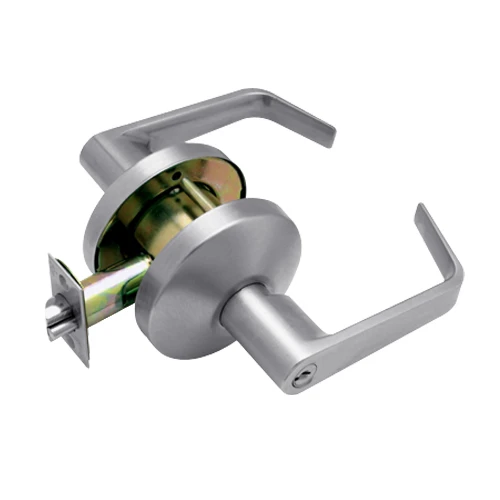
The Falcon B Series is a Grade 1 cylindrical lever lock for schools, healthcare and institutional doors. It installs on standard 2-3/4 in. backset cylindrical prep, and the chassis is certified to ANSI/BHMA A156.2 Series 4000 Grade 1. The three functions in this article all use the same chassis, the same Dane lever and the same 6-pin cylinder pinned to 5 chambers in satin chrome (626). The inside of the door is where they part ways.
B501PD: entry
B501PD-D-626 is the entry function. The outside lever is keyed. Inside there is a turn-button that holds the outside lever locked, and the inside lever always allows free exit. Turn the button and the door stays locked from the outside until someone with a key opens it, or until someone inside turns the button back. This is the lock for a door that is locked most of the time and opened by key: a private office, a records room.
B511PD: entry/office
B511PD-D-626 is entry/office. The outside is still keyed, but the inside has a push-button that holds the outside lever locked after hours. The inside lever is always free to exit. The practical difference from the entry model is the button, and the catalog describes the push-button as the after-hours setting. In the building, this is the lock for the front office or a counselor's door: unlocked during the day so people walk in, pushed to locked when staff leave.
Here is where I tell customers to slow down. Entry and entry/office look nearly identical in a catalog. The inside hardware is different. If the door is meant to be locked and unlocked from the inside by the person behind it, read the function description on the page and match it to what the person at the door is going to do. If you have already got a similar Falcon on a door in the building, the function code in the part number is the same code. If you run mortise locks as well, our write-up on Falcon MA561 versus MA581 goes through the function choice on the mortise side.
B561PD: classroom
B561PD-D-626 is classroom function. The outside lever locks and unlocks by key from the outside only. There is no inside button to be left set. The inside lever always exits. That is the point of the lock: a teacher locks the door from the hallway with a key, and the room cannot be left locked by someone inside who wandered off. It is also why this one is the lockdown choice for a lot of schools, because the person in the hallway controls the door and nobody inside can undo it by accident. For the full run on classroom and storeroom, our piece on the Falcon T561 and T581 classroom and storeroom locks is the best place to start.
Not sure what is on your door now?
When I inherit a building I walk the doors and read the inside hardware. A turn-button on the inside lever means entry. A push-button means entry/office. Nothing on the inside means either classroom or a function with no inside control at all, and you read the stamping on the lock to be sure. Write the finding on a list, door by door, and order against the list. Ordering from memory is how a box of locks ends up one function off for half the wing.
It is also worth walking that list with whoever uses each room. A counselor's office and a records closet may both have been entry once, and the people behind them need very different things from the inside. Ten minutes in the hall saves a return.
Dane or Quantum
All three are shown with the Dane lever. The same functions also come with the Quantum lever, and the B501 is an example: B501PD-Q-626. The lever is a style choice. The function code, the chassis and the cylinder do not change, so pick the lever that matches the rest of the building and keep the numbers (501, 511, 561) the same.
Reading the part number
B is the series. The three digits after it (501, 511, 561) are the function, and the product titles confirm which is which. The letter after the PD is the lever style, D for Dane and Q for Quantum, and the last three digits are the finish, 626 for satin chrome. I do not decode the PD segment, because the catalog does not tell me what it stands for. I match the function digits, then the lever, then the finish, and I stop at the function digits first because those decide what the door does.
Picking fast
Ask what the person on the inside needs to do. Hold the door locked with a button on a private door: 501. Unlock it for the day, push it to locked after hours: 511. Lock from the hall by key only, nothing inside to leave set: 561. If the door is a storeroom, the answer is a different function, and I would rather you call than order from a title.
Common questions
What is the difference between Falcon B501 and B511?
Both are keyed on the outside. The B501 has a turn-button inside, and the B511 has a push-button inside that holds the outside lever locked after hours.
Does the Falcon B561 have an inside button?
No. The classroom function locks and unlocks by key from the outside only, and the inside lever always exits.
What backset do the Falcon B Series locks fit?
They install on standard 2-3/4 in. backset cylindrical prep.
Are these locks Grade 1?
Yes. The chassis is certified to ANSI/BHMA A156.2 Series 4000 Grade 1.
What is the difference between the Dane and Quantum lever?
It is the lever style. The function and the chassis are the same. Pick the one that fits the rest of the building.
See the full range on our Falcon page. If you are not sure which function your door needs, call us before you order.