
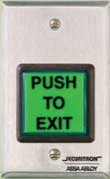
Securitron EEB2 vs EEB3N Emergency Exit Button
Posted by Kent on 7th Oct 2026
The button that backs up your motion sensor
A magnetic lock holds a door shut with power. When the power drops, the door lets go. That is the whole idea, and it is also why the people who write and enforce egress rules care so much about the ways a maglock door can fail to open. A motion sensor over the door is the usual way out. It sees someone approach and drops the lock. Sensors miss. A cart sits in front of the eye, a person walks up slowly, a dusty lens stops seeing. That is where a hard button next to the door comes in.
Securitron makes two of them that we stock: the EEB2 and the EEB3N. They do the same job. They differ in the size of the button and in what kind of wall or frame you can mount them on. This is a short guide to picking between them.
What the catalog says both of them do
Straight from the listings, so you know I am not guessing:
- It mounts right next to the door.
- One press releases the door for 30 seconds.
- It is re-triggerable. Press it again during the 30 seconds and the clock starts over.
- Contacts are SPST, 3 amp, wet, normally closed.
- It runs on 12 or 24 VDC. The listing says the voltage must match the lock you installed.
- It is UL listed.
- It is for indoor use only.
That last line matters. A button on an exterior wall, or on a door that sees weather from the inside, is the wrong product. Keep it inside the building where the people leaving can see it.
EEB2 or EEB3N: the button and the box
The difference is physical. Here are the two as the catalog describes them:
- The EEB2 has a 2 inch square button. The listing notes that this is the button size, not the backplate size. It mounts on a single gang box. It comes with switchable green, red and blue ADA lenses.
- The EEB3N has a 1 inch by 3/4 inch rectangular button, again the button and not the plate. It is the narrow stile install. It comes with switchable green and red lenses.
So the question for a buyer is where it goes. If you have a drywall or block wall beside the door with room for a standard electrical box, the EEB2 is the easy answer. The big square target is easy to hit with a hip or an elbow, which helps someone who is carrying a load. If the door is a narrow stile aluminum storefront door with a skinny frame and nowhere to put a single gang box, the EEB3N is built for it. I have seen people try to force a standard device into a narrow stile and end up with chewed-up aluminum. Pick the product made for the frame you have.
The lens options on the EEB2 are the main reason I would reach for it on a new install if the wall allows. You can switch the colors, so you can match the buttons already in the building. Either way, look at what is on the property and stay consistent. People learn where to push in a building. Do not make them learn it twice.
The code question, answered carefully
I am a locksmith, not a code official, so here is what we know and what we do not.
The catalog says Securitron's UL294 certification means that when the EEB is used with the XMS motion sensor, the combination meets the NFPA 101 Life Safety Code requirement for exit of access controlled egress doors. That sentence is the maker's statement about the pair. It says nothing about a button used with some other sensor, and it does not decide what your local authority having jurisdiction will approve. Before you hang a maglock on a door that people have to use in a fire, call the fire marshal or the building department and ask what they want to see. Some want a button, a sensor and a release tied to the fire alarm. Some want less. A phone call costs nothing and a failed inspection costs a callback.
Keep the idea straight: the button is the manual backup, the sensor is the normal path, and the fire alarm release is a third path that a lot of jurisdictions also require. They are not substitutes for each other.
Match the voltage to the lock before you order
The 12 or 24 volt note in the listing is easy to read past. The button sits in the circuit that feeds the lock, so it has to suit the voltage the lock runs on. Look at the lock's label, or at the power supply setting. If you have a lock that runs on 12 volts and a power supply set to 24, you have a different problem, and it is bigger than the button. Fix the supply first.
The contacts are rated for 3 amps. For most single-door maglocks that is fine. If you have a heavy pair of doors on one supply, add up the current of everything the button would carry before you assume it will work. Do not guess at the wiring terminals either. The instruction sheet in the box shows them. Read it with the power off.
Where to mount it
I give the same advice every time. Put the button on the wall beside the door, at a height a person can reach without thinking. Keep it clear of coat hooks, vending machines and anything else that will block it. If you stand at the door and cannot find the button in two seconds, a stranger in a hurry will not find it either. The point of the thing is to be obvious.
If you are working through the rest of the opening, we covered the other side of a maglock door in our Securitron DPS-M versus DPS-W write-up, and the power transfer piece in EPT versus CEPT.
Common questions
How long does the door stay unlocked after I press an EEB?
The catalog says 30 seconds. The unit is re-triggerable, so pressing again restarts the 30 seconds.
Can I use an EEB2 or EEB3N outside?
No. The listing says indoor use only.
Which one fits a narrow stile aluminum door?
The EEB3N. The listing calls it the narrow stile install, and the EEB2 is made for a single gang box.
Does the button run on any voltage?
It runs on 12 or 24 VDC, and the voltage must match the lock you installed.
Does the button replace a motion sensor?
No. The catalog describes it as added safety for the case where a motion exit sensor fails. Ask your local code official what combination they require.
The rest of the line is on our Securitron page. Tell us the lock model, the voltage and the type of frame, and we will point you to the right button.