
CompX C9100 vs C9200: Which Way Does Your Mailbox Lock Turn
Posted by Kent on 1st Nov 2026
Two locks, one letter apart, and only one fits your box
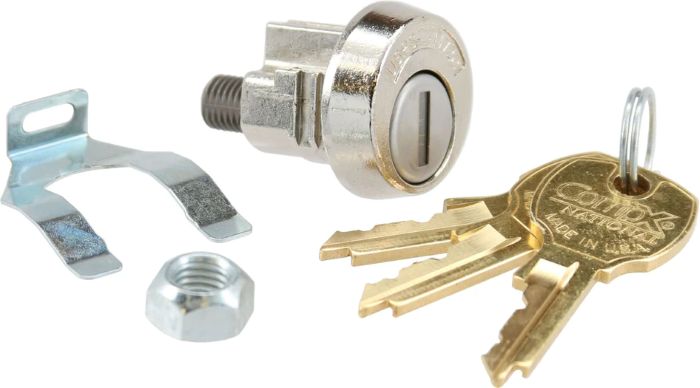
The CompX National C9100 and C9200 are the same lock turned the opposite way. Same pin-tumbler cylinder, same included parts, same USPS listing. The C9100 locks clockwise. The C9200 locks counter-clockwise. The listing says it plainly: ordering the wrong rotation is the single most common mistake on these. So before anything else, find out which way your box throws.
What the two locks have in common
| C9100 | C9200 | |
|---|---|---|
| Cam rotation to lock | Clockwise (CW) | Counter-clockwise (CCW) |
| USPS listing | Approved for new CBU and 4C cluster box installations | Approved for new CBU and 4C cluster box installations |
| Cylinder | Pin tumbler, key-retaining | Pin tumbler, key-retaining |
| Keying | Keyed different, about 2,000 key changes | Keyed different, about 2,000 key changes |
| Keys included | 3 | 3 |
| Mounting hole | 0.76 in diameter by 0.635 in width | 0.76 in diameter by 0.635 in width |
| In the box | Lock body, spring clip, mounting nut, 3 keys | Lock body, spring clip, mounting nut, 3 keys |
What "USPS approved" actually means for you
The listing describes the C9100 as one of only two mailbox locks formally listed by the USPS as approved for new CBU and 4C cluster box unit installations. CBU is the neighborhood pedestal box. 4C is the horizontal wall of tenant compartments you see in an apartment mailroom. If you are outfitting one of those new, or replacing a lock in a unit built to that spec, this is the kind of lock the Postal Service and the box makers expect to find. The listing's warning is worth repeating: anything not on the approved list can get an installation rejected at inspection. That is why people buy these by model number and not by "a lock that fits."
I cannot tell you from a listing what your local postmaster will accept on an older or non-standard box. If that is your situation, ask them before you buy a bank of locks.
Clockwise or counter-clockwise: how to find out
The cam is the little arm on the back of the lock. It has to swing the right direction to throw the latch on your particular box, and the two rotations are not interchangeable. The listing's advice is to look at how the existing lock throws. In practice that means:
- With the door open and a working lock in place, turn the key from unlocked to locked and watch the cam. The direction it travels is the direction you need.
- If the lock is already gone, look at where the cam rests against the latch or stop. The stop tells you which way it has to sweep.
- If the box is one of a bank, check a neighbor. Banks are normally built the same way, but confirm it. Do not assume that because compartment 1 is clockwise, compartment 40 is too.
When you are standing there with a cam in your hand and cannot tell, take a photo of the back of the door and call. It is cheaper than a return.
Key-retaining: why tenants cannot walk away with the key in the lock
Both locks are key-retaining. The key cannot be pulled out until the lock is returned to the locked position. On a shared tenant box that matters: a compartment is never left unlocked with the key already gone. It also means a tenant who turns the key and tugs and finds it will not come out has simply not finished the turn. That is a service call you can avoid with one sentence on the move-in sheet.
Keyed different, and what to do when a tenant moves out
Each lock ships on its own key change, drawn from a pool the listing puts at about 2,000. No two tenants share a key. When a tenant loses a key or moves out, you do not rekey the whole bank. You swap the one lock. It drops in with the spring clip and mounting nut that come in the box, and three keys arrive with it, so no separate keying order is needed.
The listing adds that the lock can be factory keyed alike if you order a keyed-alike group, though the stock configuration is keyed different. For a mailroom, keyed different is almost always what you want. Keyed alike is for a case like a single owner with a row of utility compartments.
Installing it
- Confirm the rotation, as above.
- Check the door cutout against the lock: a 0.76 inch diameter hole with 0.635 inch of width. The listing says these are dimensioned to the standard CBU and 4C opening, so a box built to that spec should need no drilling.
- Drop the lock through the cutout and secure it from behind with the spring clip and mounting nut.
- Set the cam for your latch geometry. Cycle the key and check that the latch throws fully and the key only comes out when locked.
Test it with the door open first, then closed. A cam that clears on the bench and drags on the door usually means the latch geometry, not the lock.
Who buys these
The listing names locksmiths servicing apartment and HOA mailrooms, property managers, mailbox and 4C unit installers and USPS-approved dealers. If you already stock cabinet and drawer locks, the same thinking applies. See the Olympus 200DW keyed alike and keyed different for the tradeoff, or the N078, R078 and T37 rekeyable drawer locks for another approach. Both locks sit in the cabinet lock category, and the CompX National page lists the line.
Common questions
What is the difference between the CompX C9100 and C9200?
Rotation. The C9100 locks clockwise and the C9200 locks counter-clockwise. Everything else on the two listings matches.
Are the CompX C9100 and C9200 USPS approved?
The listing says they are listed by the USPS as approved for new CBU and 4C cluster box unit installations.
How many keys come with the C9100?
Three, along with the spring clip and mounting nut. The lock arrives keyed different, so no separate keying is needed.
Can I swap a clockwise lock for a counter-clockwise one?
Not on the same box. The cam must travel the right way to throw the latch, so match the rotation of the lock you are replacing.
Do I need to rekey the whole mailbox bank when a tenant moves?
No. Each lock is keyed different. Replace the one lock and the other compartments are untouched.